
Make food moneylast until payday.
Plan what to cook. Know what it costs before you shop. Make your budget survive the month.
No store account needed. Open the file, allow “install unknown apps”, done — there is a short version of that below.
Real screens from Survive the Month.
Built for the last week of the month.
Not a generic budget tracker. Every screen answers one question: can this month’s food money make it to payday?
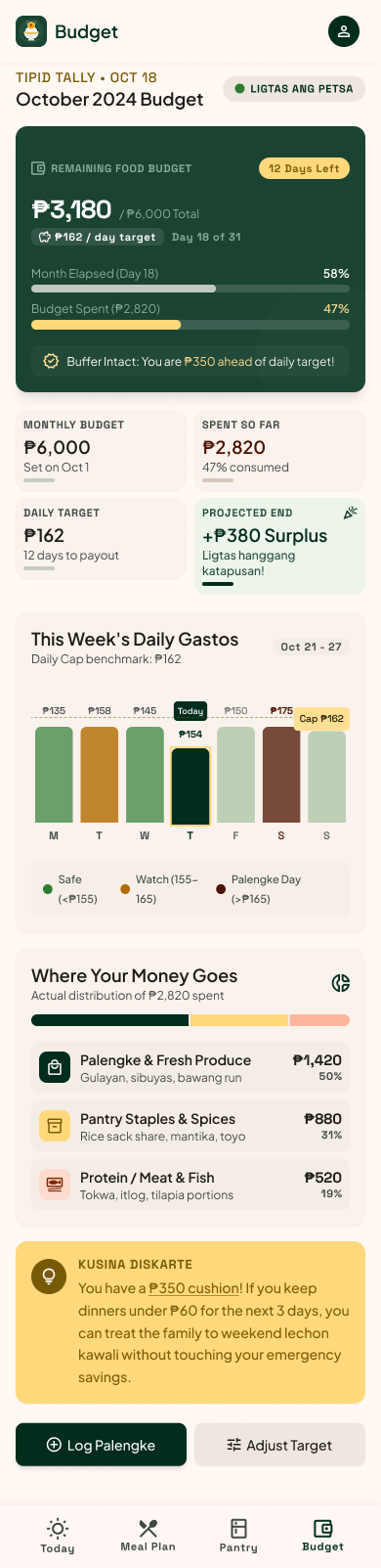
The Budget screen — real build v0.6.0.
The whole month, on one screen.
Remaining budget, days left, and a pace verdict in plain words — LIGTAS ANG PETSA when you’re safe, MALAMING PETSA when you’re drifting. You know by day 10, not day 29.
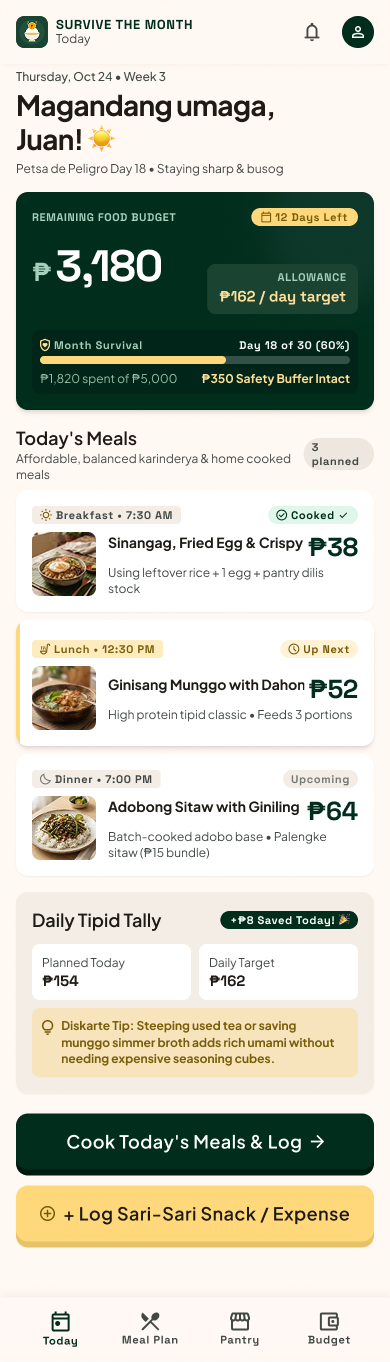
The Home screen — real build v0.6.0.
Today, priced to the peso.
Three meals with a cost on every plate, a survival bar for the month, and a tipid tally that shows what today’s discipline actually saved.
Your budget becomes a meal plan.
Change the three numbers. The plan underneath re-costs itself — this is the same arithmetic the app runs when you finish onboarding.
Feeding 4 for a month ₱200 a day
An example, using the app's own dishes and palengke staples. Your household and your market would give different numbers.
That is what all three meals have to fit inside.
Different squeeze,
same payday.
The arithmetic is identical every time. What changes is the number going in, and that is the whole difference between a good week and a bad one.
Minimum-wage earner, whole family
The paycheck runs out on the 20th
Everyone at the table, one salary, and a food budget already set by what’s left after the bills. The last week is the problem, not the first.
Living alone, one income
Cooking for one is the hard part
A recipe written for four means either waste or four nights of the same adobo. Market quantities are the thing that breaks when there is only one mouth.
The budget just shrank
Prices went up, or the work did
Rent went up, or an hours cut, or a price rise at the market. The plan you liked last month is now quietly too expensive to keep.
Six or seven at the table
One pot, no leftovers
Big household, small kitchen. Cooking for six is a different problem from cooking for two — the batch either runs out by Wednesday or sits in the fridge until it’s a problem.
Prices aren't theoretical.
Meals are costed against real prices from regional Filipino markets — the ones your province actually pays. Coverage is still growing, and where a dish is thinly covered the app says so instead of inventing a number.
Figures shown are from a seeded household. Your market, your prices — the app reads the region you pick.
Three steps, then it's just dinner.
Tell us your budget
Household size, what you can spend this month, your region, and what is already in the kitchen.
Get your week
Seven days of ulam, each meal priced, all of it inside your daily cap.
Cook, log, survive
Tick meals off as you cook, log gastos as you spend, and get a heads-up before the 15th.
Hindi kailangan maging perfect.Kailangan lang umabot hanggang payday.
Most households here cook month to month, not week to week. The app isn't trying to make you eat better or spend less — it's trying to make the number you already have stretch to the next payday, and to be honest with you when it can't.
Asked, answered honestly.
The questions people actually ask before installing an app that isn’t in the store yet.
Is it really free?
Yes — during early access, everything in the app is free. Your first account takes about a minute to set up. When the store listings arrive, the core planner stays usable on a free account.
Why do I have to install the APK myself?
The app is not on Google Play yet, so Android installs it directly — called sideloading, and it is a normal Android feature, not a hack.
Play Protect will show a warning for any app that did not come from a store; that warning is expected. The build is signed, and the store listings go up once that work is finished properly.
Where do the prices come from?
A real price book, not assumptions: market price observations collected per region and turned into medians that your plan is costed against. Every dish shows how much of its cost is measured and how much is estimated.
What if my region or ingredient isn't covered yet?
You still get a plan — it is labelled as estimated rather than dressed up as exact. Coverage grows as the price book does, and the app tells you when a number is thin instead of pretending it isn't.
Is there an iPhone version?
In progress. Android came first because it is where most of the households this is built for are. The status section below tracks exactly where things stand.
Early access, honestly labelled.
Ready to make it to payday?
Start with your monthly food budget. Free during early access — your first account takes about a minute.
- Download the APKTap the button above. The file is about 24.7 MB.
- Allow your browser to install itAndroid will ask. Turn on “install unknown apps” for the browser you used, then go back.
- Open the file and installTap the downloaded APK, confirm, and the app appears with the rice bowl.
Android 7.0 and up, arm64 phones — that is almost every handset made since about 2017. An older or 32-bit phone? Use the armeabi-v7a build instead. Your first account is free and takes a minute.